


For decades, we’ve all known what “good code” looks like. Thorough tests. Clear documentation. Small, well-scoped modules. Static typing. Dev environments you can spin up without a minor religious ritual.
These things were always optional, and time pressure usually meant optional got cut.
Agents need these optional things though. They aren’t great at making a mess and cleaning it up later. Agents will happily be the Roomba that rolls over dog poop and drags it all over your house.
The only guardrails are the ones you set and enforce. If the agentic context is lacking and the guardrails aren’t sufficient, you’ll find yourself in a world of pain1. But if the guardrails are solid, the LLM can bounce around tirelessly until the only path out is the correct one.
Our six-person team has made a lot of specific and, sometimes, controversial investments to accommodate our agentic coders. Let’s talk about some of the less obvious ones.
100% Percent Code Coverage

The most controversial guideline we have is our most valuable: We require 100% code coverage2.
Everyone is skeptical when they hear this until they live with it for a day. It feels like a secret weapon at times.
Coverage, as we use it, isn’t strictly about bug prevention; it’s about guaranteeing the agent has double-checked the behavior of every line of code it wrote.
The usual misinterpretation is that people think we believe 100% coverage means “no bugs”. Or that we’re chasing a metric, and metrics get gamed. Neither of those are the case here.
Why 100%? At 95% coverage, you’re still making decisions about what’s “important enough” to test. At 99.99%, you don’t know if that uncovered line in ./src/foo.ts was there before you started work on the new feature. At 100%, there’s a phase change and all of that ambiguity goes away3. If a line isn’t covered, it’s because of something you actively just did.
The coverage report becomes a simple todo list of tests you still need to write. It’s also one less degree of freedom we have to give to the agent to reason about.
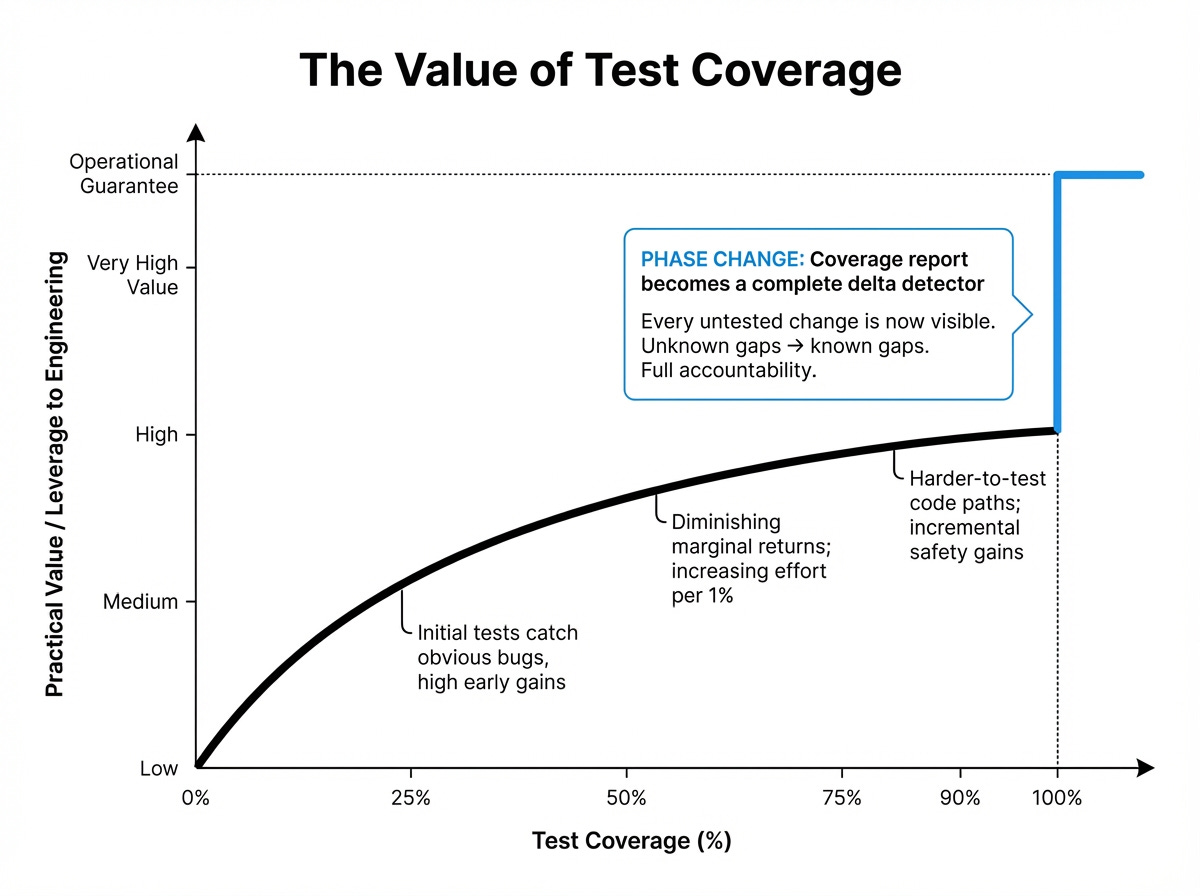
When a model adds or changes code, we force it to demonstrate how that line behaves. It can’t stop at “this seems right.” It has to back it up with an executable example.
Other nice benefits: Unreachable code gets deleted. Edge cases are made explicit. And code reviews become easier because you see concrete examples of how every aspect of the system is expected to behave or change.
Namespaces Are One Honking Great Idea. Let’s do more of those.4

The main mechanism agentic tools use to navigate your codebase is the filesystem. They list directories, read filenames, search for strings, and pull files into context.
You should treat your directory structure and file naming with the same thoughtfulness you’d treat any other interface.
A file called ./billing/invoices/compute.ts communicates much more than ./utils/helpers.ts, even if the code inside is identical. Help the LLM out and give your files thoughtful organization.
Additionally, prefer many small well-scoped files.
It improves how context gets loaded. Agents often summarize or truncate large files when they pull them into their working set. Small files reduce that risk. If a file is short enough to be loaded in full, the model can keep the entire thing active in context.
In practice, it will speed up the agent’s flow and eliminate a whole class of degraded performance.
Fast, Ephemeral, Concurrent Dev Environments

In the old world, you lived in one dev environment. This is where you’d craft your perfect solution, tweak things, run commands, restart servers, and gradually converge on a solution.
With agents, you do something closer to beekeeping, orchestrating across processes without knowing the specifics of what exactly is happening within each of them. So you need to cultivate a good and healthy hive.
Fast
You need your automated guardrails to run quickly, because you need to run them often.
The goal is to keep the agent on a short leash: make a small change, check it, fix it, repeat.
You can run them a few ways: agent hooks, git hooks, or just prompting (i.e. in your AGENTS.md), but no matter how you run them, your quality checks need to be cheap enough that running them constantly is not slowing things down.
In our setup, every npm test creates a brand new database, runs migrations, and executes the full suite.
This only works for us because we’ve made each of those stages exceptionally fast. We run tests with high concurrency, strong isolation, and a caching layer for third-party calls5. We have 10,000+ assertions that finish in about a minute. Without caching, it takes 20-30 minutes, which would add hours if you expected an agent to run tests several times per task.
Ephemeral
Once you get comfortable with agents, you naturally start running many of them. You’ll spin up and tear down many dev environments multiple times a day. That has to all be fully automated or you’ll avoid doing it.
We have a simple workflow here:
new-feature <name>
That command creates a new git worktree, copies in local config that doesn’t live in git (like .env files), installs dependencies, and then starts your agent with a prompt to interview you to write a PRD together. If the feature name is descriptive enough, it may even just ask to get right to work, assuming it can figure out the rest of the context on its own.
The important part isn’t our specific scripts. It’s the latency. If it takes minutes and involves a bunch of tinkering and manual configuration, you won’t do it. If it is one command and takes 1-2 seconds, you’ll do it constantly.
In our case, one command gives you a fresh, working environment almost immediately, with an agent ready to start.
Concurrent
The final piece is being able to run each environment at the same time. Having a bunch of worktrees doesn’t help if you can only have one of them active at a time.
That means anything that could conflict (e.g. ports, database names, caches, background jobs) needs to be configurable (ideally via environment variables) or otherwise allocated in some conflict-free way.
If you use Docker you get some of this for free, but the general requirement is the same: you need a solid isolation story so you can run several fully functioning dev environments on one machine without cross-talk.
End-To-End Types

More broadly, automate the enforcement of as many best practices as you can. Remove degrees of freedom from the LLM. If you’re not already using automatic linters and formatters6, start there. Make those as strict as possible and configured to automatically apply fixes whenever the LLM finishes a task or is about to commit7.
But you should also be using a typed language8.
Entire categories of illegal states and transitions can be eliminated. And types shrink the search space of possible actions the model can take, while doubling as source-of-truth documentation describing exactly what kind of data flows through each layer.
TypeScript
We lean on TypeScript pretty heavily. If something can be reasonably represented cleanly in the type system, we do it.
And we push semantic meaning into the type names. The goal is to make “what is this?” and “where does it go?” answerable at a glance.
When you’re working with agents, good semantic names are an amplifier. If the model sees a type like UserId, WorkspaceSlug, or SignedWebhookPayload, it can immediately understand what kind of thing it is dealing with. It can also search for that thing easily.
Generic names like T are fine when you’re writing a small self-contained generic algorithm, but much less helpful when you’re communicating intent inside a real business system.
OpenAPI
On the API side, we use OpenAPI and generate well-typed clients, so the frontend and backend agree on shapes.
Postgres
On the data side, we use Postgres’ type system as best as we can, and add checks and triggers for invariants that don’t fit into simple column types. Postgres doesn’t have a particularly rich type system, but it has enough there to enforce a surprising amount of correctness. If an agent tries to write invalid data, our database will usually complain clearly and loudly. And we use Kysely to generate well-typed TypeScript clients for us.
All of our other 3rd-party clients either give us good types, or we wrap them to give us good types.
Agents are tireless and often brilliant coders, but they’re only as effective as the environment you place them in. Once you realize this, “good code” stops feeling superfluous and starts feeling essential.
Yes, the upfront work feels like a tax, but it’s the same tax we’ve all been dodging for years. So pay it intentionally. Put it on your agentic roadmap, get it funded by eng leadership, and finally ship the codebase you always hoped for.
Often, when teams struggle with agentic coding, it’s AI reflecting and amplifying their codebase’s worst tendencies.
100% coverage is actually the minimum bar we set. We encourage writing tests for as many scenarios as is possible, even if it means the same lines getting exercised multiple times. It gets us closer to 100% path coverage as well, though we don’t enforce (or measure) that.
It’s also remarkably easy to maintain 100% once you hit it. The coverage report enumerates exactly what lines need testing, which the LLM happily handles.
Among other mechanisms, we use githooks for this.
Don’t use Python. Even with type annotations. Just use TypeScript. It makes me a little sad to say, having written Python for 20+ years, but TypeScript’s is just a much better type system.
When we run tests in CI/CD, after the PR is approved, we run them without caching just to ensure there wasn’t a subtle assumption violated by the cache. It also double-checks that we’re still talking to all of our 3rd-party integrations correctly.
Types have been the biggest improvement for us. I also let the agent leave comments in some places where I made a design decision that is not fully aligned, or there is some technical debt that I am aware of but do not want to touch right now (which will naturally confuse the agent), I leave commentary there why that's the case. In the end, the biggest thing to manage is how do you ensure the context you have in your mind transferred to the agent on run time. OpenAI had a good blogpost about agent harness that has parallels to your article. Thanks for sharing
Your footnotes might be shuffled. I bet "The Zen of Python" was meant to be linked to the title "Namespaces Are One Honking Great Idea. Let’s do more of those".