


We recently wrote about using machines to review code. Now we’ve open-sourced the GitHub Action to generate those diagrams. To use it, you just need to import the workflow into your Logic organization and wire up the GitHub action.
How it Works
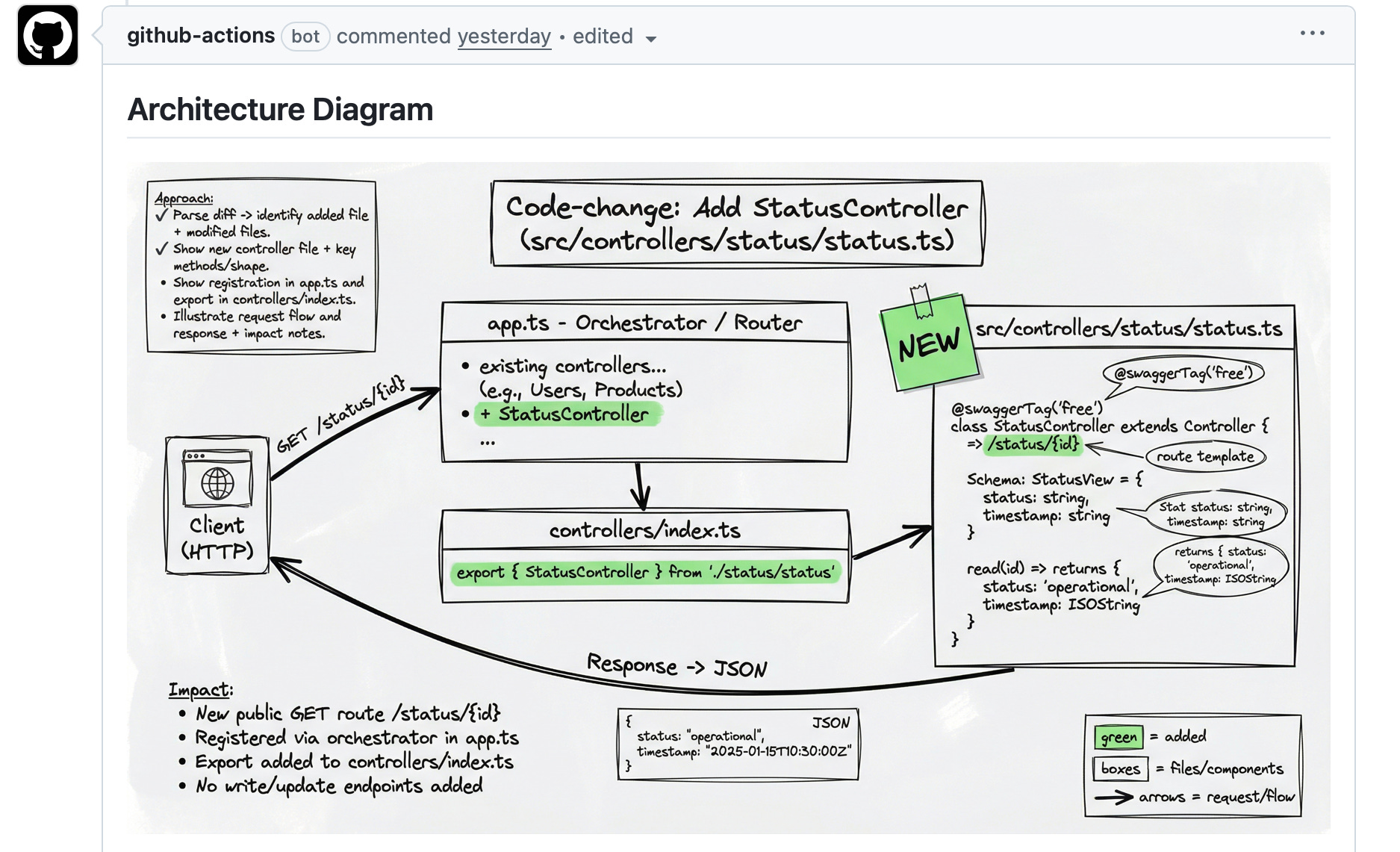
Once set up, just comment /generate-diagram on a PR. Logic reads the changes and posts a diagram right into the the pull request thread.
Example
Here’s an example diagram from a small change I prototyped to add a new status controller to our API.
Setup Instructions (3 mins)
In your Logic Organization, create a Full Permissions API Key1.
After importing the workflow, note the Document ID in the
Integrationstab from the Endpoint.In GitHub, add a new workflow file that uses the @with-logic/logic-diagram-action@beta step to work off pull requests (Example workflow file below).
Add a new repo secret for the
LOGIC_API_TOKENfrom Step #1 to call the API.Add a new repo variable
LOGIC_DOCUMENT_IDwhich is the new Document ID from Step #2.You can also pass in a version if you want to specify anything besides a
draftversion.
Now when you comment /generate-diagram, a diagram based on the pull request will be generated.
Other notes
Image Hosting: Small images appear right in the comments. For images larger than 65kb in size, we provide a presigned URL that will last for an hour2.
Dead links: If the link expires you can comment
/regenerate-diagramto refresh the diagram’s presigned URL link. You can also download and re-upload the image somewhere more permanent.Limits: There’s a daily limit on image generation per organization, so at some point you might get a rate limit error3.
Give it a try, and hopefully it’s a fun way for you to improve your PRs as you start 2026!
Example Workflow
# .github/workflows/logic-diagram.yml
name: logic-diagram
run-name: ${{ github.actor }} - Logic Diagram
on:
issue_comment:
types: [created]
jobs:
diagram:
if: |
github.event_name == ‘push’ ||
(github.event.issue.pull_request &&
(contains(github.event.comment.body, ‘/generate-diagram’) ||
contains(github.event.comment.body, ‘/refresh-diagram’)))
runs-on: ubuntu-latest
permissions:
pull-requests: write
contents: read
steps:
- name: Logic Diagram Action
uses: with-logic/logic-diagram-action@beta
with:
github_token: ${{ secrets.GITHUB_TOKEN }}
document_id: ${{ vars.LOGIC_DOCUMENT_ID }}
env:
LOGIC_API_TOKEN: ${{ secrets.LOGIC_API_TOKEN }Full permissions all you to refresh the presigned urls. If you’re going to be storing / re-uploading them yourself, you can stick to a Execution Only Token.
Current limitation we impose on file urls. We’ll make this more flexible soon.
Paid accounts have higher limits.